SINC: Crew & Job Tracker
- 4.4
- Rating
- 100.00K
- Installs
- Free
- Price

 Analysis by App-foxy
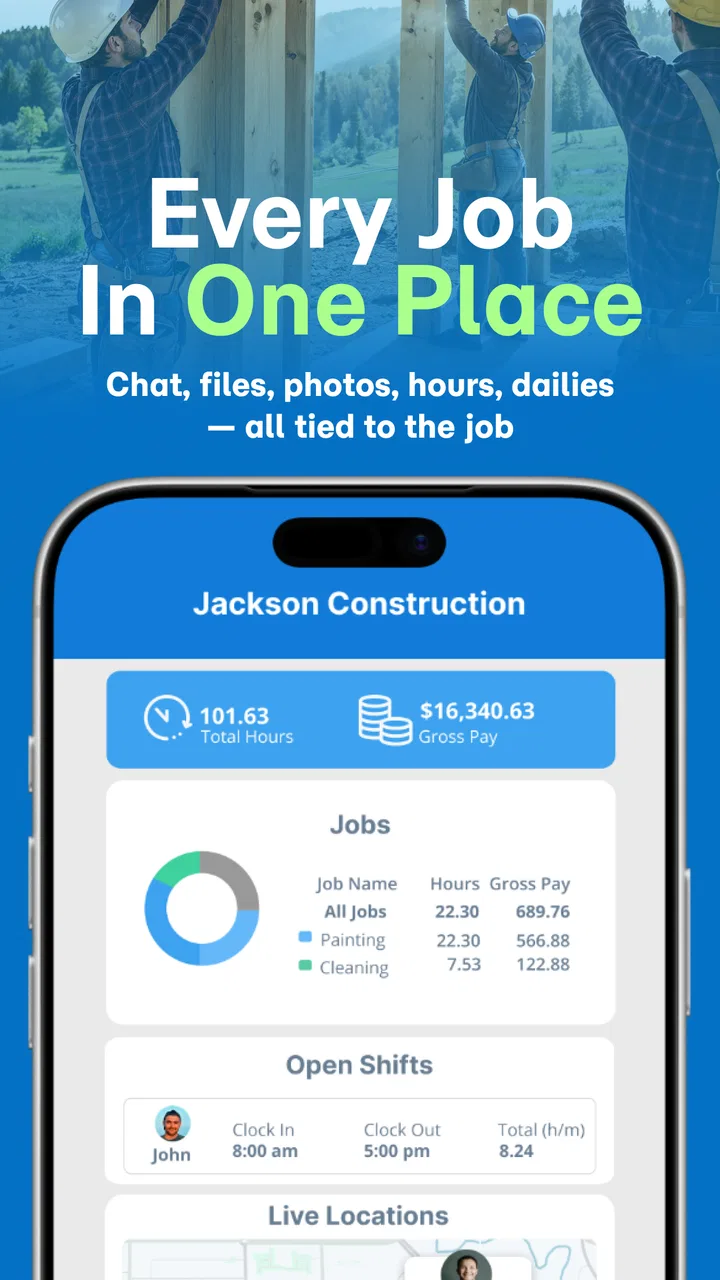
I found SINC: Crew & Job Tracker most useful when I treated it as a shared work log rather than just another chat app. It is a business app from SINC for keeping jobs, crews, locations, conversations, files, photos, daily updates, and hours closer together. That combination makes sense for field teams, contractors, supervisors, and office staff who are tired of reconstructing a project from scattered messages and camera rolls.
My first impression was practical rather than flashy. The value is in reducing the small gaps between what happened on site, who was there, which files were shared, and what still needs attention. It is free to install, has a Teen content rating, and runs on Android devices using version 7.0 or later. With more than 100,000 installs and a 4.4 average from roughly 961 ratings, it has clearly found an audience, although popularity alone does not guarantee that it will fit every company’s routine.
Where teams usually get stuck
The hardest part of using a work-tracking app is rarely opening it. The friction usually appears when a real job becomes busy: several people post updates at once, a supervisor needs a photo from earlier in the day, someone forgets to record hours, or a crew member sends an important detail in a separate messaging app. SINC is designed to bring those pieces into a job-focused workspace, but the team still needs a consistent habit for using it.
You May Also Like

 Blood Strike: 2.5 Anniversary
Blood Strike’s Loadouts Turn Every Drop Into a Tactical Gamble
A close look at Blood Strike’s custom loadouts: how fast access to signature weapons reshapes its battle royale rhythm, rewards preparation, and narrows the gap between fights.

 Pandora - Music & Podcasts
Pandora’s Music Is Easy to Start, but Harder to Recover
Pandora’s strength is its low-effort path from a seed to a station. Its weak spot is how much confidence it asks you to place in connection, setup, and quiet recovery.

 8 Ball Pool
8 Ball Pool Is Built on Rivalries, Rematches, and Routine
A close look at the rivalries, rematches, shared routines, and unanswered safety questions that turn a quick pool match into a persistent mobile community.

 Samsung Music
Samsung Music’s Quiet Strength Is Playing What You Already Own
Its reach comes less from spectacle than from dependable access to a personal library. That simplicity is both the app’s strongest retention engine and its ceiling.

 AccuWeather: Weather Radar
AccuWeather Review: A Quick, Clear Forecast for Everyday Decisions
For everyday plans, the best forecast is the one you can understand quickly. AccuWeather makes rain timing, radar, and local conditions easy to act on, with a few trade-offs.

 Hill Climb Racing
Why Hill Climb Racing Still Turns Crashes Into One More Run
A tiny car, a bumpy hill and one more upgrade: Hill Climb Racing keeps resurfacing because its simple chaos makes every near-miss feel personal.
More From Our News Desk



I would not roll it out by telling everyone simply to “put everything in SINC.” That instruction is too vague. A better approach is to decide what belongs in a job record, what belongs in a conversation, and what should remain outside the app. For example, a site photo is more useful when it is attached to the relevant update instead of uploaded without context. A short daily note should explain what changed, not merely say that the crew was present.
Another common sticking point is live location information. Location can be valuable to a dispatcher or manager trying to understand where crews are, but it can also create confusion if people assume it replaces a proper status update. A map position may show where a device is; it does not necessarily explain whether a task is finished, blocked, or waiting for materials. I found it best to treat location as supporting context, while using job updates for the actual work story.
The same distinction matters with hours. A time entry can support payroll preparation or project review, but it is not automatically a complete explanation of what happened during that time. If a crew spends part of a shift waiting, traveling, or correcting an issue, a short note alongside the hours can prevent awkward questions later. This is one of the less obvious ways to get more value from the app: use the record to preserve decisions and context, not only numbers.
Teams can also get stuck when they expect the app to organize a messy process by itself. SINC can gather job communication and field material, but it cannot decide which naming convention your company should use or which person is responsible for closing an update. Before inviting a large crew, I would agree on simple habits such as starting messages with the job name, adding a date or area to photo notes, and marking urgent issues clearly in plain language.
What the app is trying to replace
In a small operation, the usual alternative is a mixture of group chats, email, shared folders, paper notes, and personal phone galleries. That mixture can work while the team is tiny, but it becomes fragile when someone is absent or when a customer asks for a clear timeline. SINC’s strongest argument is not that it does every office task; it is that it gives field-related information a common home.
Compared with a general chat app, the job-centered approach is more useful for retrieving project history. Compared with a basic spreadsheet, it is better suited to conversations, photos, and daily field updates. Compared with a full project-management suite, it may feel more approachable for crews that need practical coordination without adopting a large administrative system. The trade-off is that a specialist accounting, scheduling, or document-control platform may still be better for formal back-office processes.
Setup checks that prevent avoidable trouble
I would begin with the smallest realistic pilot: one active job, one supervisor, one office contact, and a few crew members. That makes it easier to see whether the team understands the workflow before several projects start producing overlapping updates. SINC is currently version 3.2.002, and the Android requirement is 7.0 or later, so checking the device age before deployment is a sensible first step.
After installation, I would check that each person can identify the correct job and understands where to post a daily update. This sounds basic, but it prevents a surprisingly costly mistake: information being placed in a general conversation when it should be attached to the project record. I would also ask each user to send a harmless test message or photo before the first live shift. A test exposes account, connectivity, or device-storage problems while the consequences are still small.
It is worth agreeing on a photo routine before relying on the app for visual records. Ask crews to capture the whole situation first, then a closer detail when necessary, and add a sentence explaining what the image proves. A photo of a damaged surface, for instance, is much more useful when the note says where it was found and what action is pending. This is a practical workflow improvement, not a feature claim: the app can hold the material, but the team must supply the meaning.
I would also clarify who is expected to enter hours and when. If everyone assumes someone else will do it, gaps appear quickly. If too many people edit the same record without an agreed routine, duplicate or confusing entries can result. A simple end-of-shift responsibility works better than asking workers to remember whenever they have a spare minute.
For location-based work, I would explain the purpose openly. Crew members should know whether the information is being used to coordinate arrivals, understand job coverage, or support dispatch decisions. Clear expectations make the feature less distracting and reduce the temptation to interpret a location dot as a full progress report. The app is most helpful when location, messages, photos, and hours are read together.
Cost is another setup question for a manager. The app is free to download, while in-app purchases are listed from $8.99 to $394.99 per item. I would review the purchase details inside the relevant store before committing a whole team, especially if the intended use involves multiple users or a longer-term business process. That check is more reliable than assuming that “free” means every business need will remain free.
A useful first-day routine
For a normal field day, I would use a short sequence. At the start, the crew confirms the job and shares any immediate obstacle. During the work, photos and notes are added when something changes, not in one rushed batch hours later. At the end, the responsible person records hours and posts a concise daily summary. This sequence creates a readable trail without turning every minor action into paperwork.
The important detail is timing. If updates are postponed until the evening, people forget measurements, locations, and decisions. If every small thought becomes a notification, the record becomes noisy. I prefer posting when an event changes the next action: a delivery is late, a defect is found, a section is completed, or a customer request alters the plan.
For an office manager, the first-day routine also provides a quick test of fit. Can the office understand what happened without calling the crew repeatedly? Can a supervisor find the relevant image without searching several unrelated conversations? Can the team explain missing hours or delayed work from the record? Those questions reveal more than a polished demonstration.
Recovering a workflow when something goes wrong
When an update appears to be missing, I would avoid immediately blaming the app. First, I would ask what the person actually did: did they save the message, attach the photo, select the intended job, or leave the screen before the action completed? Many “lost” records are really posted in the wrong place or never fully submitted.
The next check is the device and connection. A weak signal can interrupt field work, and a phone running low on storage or battery can make any work app unreliable. I would move to a stable connection when possible, reopen the relevant job, and verify whether the item appears before trying to recreate it. Repeating an action too quickly can create duplicates, which makes the history harder to interpret.
If a photo is not visible, I would check the phone’s own gallery first. That separates a capture problem from an upload or organization problem. If the image exists on the device, the user can try the upload again while connected reliably and add a clear note. If it was never captured, no amount of refreshing inside SINC will recover it; the practical solution is to record what is known and take a replacement image when the site allows.
For missing hours, I would compare the person’s memory with any notes, job conversations, or daily updates from the same shift. The goal is to restore an accurate record rather than simply fill a blank with a guess. A manager should also look for a repeated pattern: if several people miss entries at the same point in the day, the problem is probably the process, not individual carelessness.
When a location seems wrong, I would check whether the device has recently moved, whether the user is looking at current information, and whether the person has posted a direct status update. Location is helpful but should not be treated as an unquestionable source of truth. A crew can be near a job while waiting in a vehicle, visiting a supplier, or handling a nearby task.
For communication breakdowns, I would use one clear recovery message rather than scattering corrections across several threads. State the job, the issue, the action already taken, and the next owner. Then add the supporting photo or file in the same place if possible. This makes the correction easier to follow later and prevents a temporary problem from becoming a permanent gap in the job history.
Keeping the record readable after a busy day
One of my favorite practical habits is writing a short “state of the job” update after a cluster of activity. It should answer three questions: what changed, what is blocked, and what happens next. This is more useful than copying every message into a summary. It also helps an office reader who was not following the conversation in real time.
Files deserve similar care. Uploading a document without explaining its purpose forces the next person to open several items just to understand which one matters. A brief description such as “revised material list for the west section” gives the file a place in the workflow. The app can gather files, but concise labels are what make that collection usable.
I would avoid using SINC as a dumping ground for unrelated company material. Keeping each job focused protects the very advantage the app offers. If a document applies to every project, a broader document-management system may be more appropriate; if it changes the work on one job, placing it with that job is sensible.
When the app is not the cause
Some problems belong to the surrounding operation. If a crew does not know which job to select, the issue is project organization. If nobody owns the daily update, the issue is accountability. If workers are expected to use the app while driving or while handling equipment, the issue is safety and scheduling, not software. I would never ask someone to create a detailed entry in a situation where doing so distracts from safe work.
There is also a limit to what a job tracker should replace. SINC may be a strong fit for field coordination, but a company with complex estimating, invoicing, formal approvals, inventory controls, or advanced resource planning may need dedicated tools alongside it. Trying to force every administrative task into one mobile app often creates more work than it removes.
Privacy and trust matter as well. A team may welcome location sharing for dispatch but react differently if the purpose is unclear. Managers should explain the operational reason for collecting and viewing work information and should avoid turning every available signal into a performance judgment. The best records help people coordinate and resolve disputes; they should not encourage constant surveillance.
I would also skip this app if your work is almost entirely individual and desk-based. If you rarely have crews, job photos, field conversations, or changing site conditions, the added structure may not justify itself. A simple task list, email system, or spreadsheet could be faster for that situation. Likewise, a large organization with strict enterprise requirements should test the complete workflow before replacing established systems.
Who gets the most from it
SINC makes the most sense for a small or mid-sized field team that needs a shared view of active work without asking every worker to become a project administrator. Contractors, maintenance crews, construction-related teams, service businesses, and supervisors moving between sites are natural candidates. The app is especially useful when the same job generates a mixture of text, images, files, hours, and location-related questions.
It is less convincing for teams that already have a disciplined, integrated system and rarely lose information between departments. In that case, adding another place to post updates could create duplication. I would also be cautious if the team has many older phones, inconsistent connectivity, or little time for onboarding. The app can simplify coordination only when the devices and habits around it are dependable enough.
My practical verdict after weighing the trade-offs
I see SINC as a focused bridge between field activity and office awareness. Its appeal comes from bringing several everyday job details into one work-oriented space instead of leaving them divided among chat threads, folders, spreadsheets, and personal phones. The best results come from using it with a clear routine: identify the job, add meaningful updates as work changes, preserve useful visual evidence, and close the day with hours and next steps.
The friction is real. Teams must learn where information belongs, managers must define ownership, and location or hours should not be mistaken for a complete progress record. The purchase range also means a business should examine the applicable plan before treating the free installation as the whole cost decision. These are not reasons to dismiss the app, but they are reasons to pilot it honestly rather than assuming adoption will happen automatically.
SINC was released on August 17, 2017, and the current Android version is 3.2.002. Its 4.4 average across around 961 ratings and more than 100,000 installs suggest a solid level of interest, while the 436 written reviews indicate that many users have taken the time to describe their experience. I would treat those figures as useful context, not as a substitute for testing the app with your own jobs and devices.
My recommendation is to try it with one active project and a deliberately simple reporting rule. If the office can understand the day without chasing people, and if crews can add photos, notes, files, and hours without slowing safe work, SINC may become a genuinely useful daily tool. If your main need is accounting, advanced scheduling, or formal document control, I would choose a more specialized system and use a field tracker only where it adds clear value.
FAQs for SINC: Crew & Job Tracker
01What is SINC: Crew & Job Tracker used for?
SINC: Crew & Job Tracker is a workforce management app designed to help service businesses organize crews, jobs, schedules, and communication in one place. It can be useful for cleaning companies, contractors, maintenance teams, and other mobile workforces. Managers can assign work and monitor progress, while crew members can view job details, update statuses, and share information from their phones.
02Is SINC suitable for both managers and field workers?
Yes. SINC is built to support different roles within a company. Owners and managers can use it to create jobs, schedule employees, assign teams, track updates, and review operational information. Field workers can access their assigned tasks, follow instructions, communicate with the office, and report job progress. The features available may depend on the user’s role and the company’s subscription or account settings.
03Does SINC include scheduling and job assignment features?
Scheduling and job assignment are central parts of SINC. Businesses can organize upcoming work, allocate jobs to specific employees or crews, and provide relevant details for each appointment. This can reduce confusion caused by scattered messages or paper schedules. Before downloading, companies should confirm that the app’s scheduling workflow matches their industry, especially if they need advanced recurring appointments, complex routing, or specialized calendar integrations.
04Can employees use SINC to communicate and update job progress?
SINC is intended to keep communication connected to daily work. Depending on the account configuration, crew members can review job instructions, send updates, record completed work, and share information with managers through the app. This may make it easier to maintain a clear record of what happened at a job site. Reliable internet access, phone permissions, and consistent employee usage are still important for timely updates.
05Is SINC: Crew & Job Tracker free to download and use?
The app may be available to download without an upfront charge, but access to business features can depend on the company’s SINC plan, trial terms, or account arrangement. Some tools may require an active subscription or administrator invitation rather than being available as a completely independent personal app. It is best to check the current listing and official pricing information before committing, since plans and included features can change.
Pros
- Centralizes crew profiles
- jobs
- schedules
- and project details in one place.
- Helps reduce missed updates with organized task and assignment tracking.
- Useful for coordinating multiple workers across ongoing projects.
- Provides a clearer overview of crew availability and workload.
- Can improve communication between managers and field teams.
Cons
- May require setup time before crew and job data is fully organized.
- Smaller teams may find some tracking features unnecessary for daily work.
- Accuracy depends on everyone keeping assignments and statuses updated.
- Users may need training to adopt a consistent workflow across the team.
- Limited value when projects are simple and managed by only one person.

SINC: Crew & Job Tracker
Gallery